Kraken connects to Viktury with a read-only API key. The key lets Viktury read your balances, trades and ledger. It cannot trade and it cannot withdraw, because you only tick the permissions that read.
Create the key
-
Sign in at kraken.com and open Settings, then API.
-
Under "Spot trading API", choose "Create API key". The "Futures trading API" section on the same page makes a different key, and Viktury does not need it.
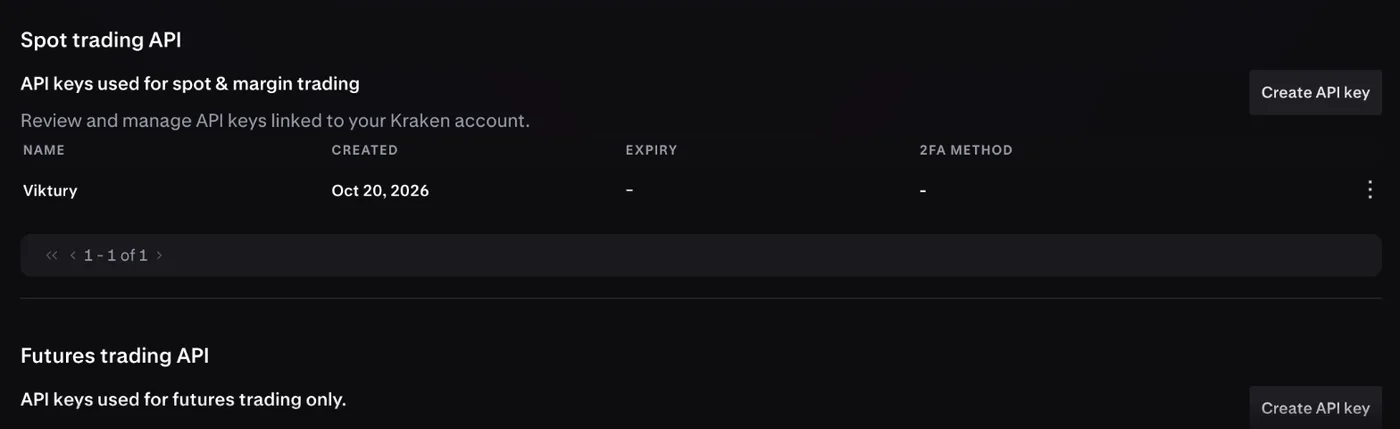
Use Create API key under Spot trading API. The Futures trading API section makes a different key that Viktury does not need. -
Tick these three permissions and nothing else:
- "Query" under "Funds permissions", so we can read your balances.
- "Query closed orders & trades" under "Orders and trades", so we can check each trade against Kraken's own trade list.
- "Query ledger entries" under "Data", so we can read your trades, deposits, withdrawals and rewards.
-
Leave every other box off: Deposit, Withdraw, Add withdrawal addresses, Earn, Query open orders & trades, Create & modify orders, Cancel & close orders, Query affiliate participants and Export data. None of them is needed to read your history, and some of them would let the key move money.
-
Leave all the toggles off. "Query start date" and "Query end date" matter most: either one hides part of your history from the key, and your balances would come out wrong. "IP address restriction" and "Key expiration" stay off too.
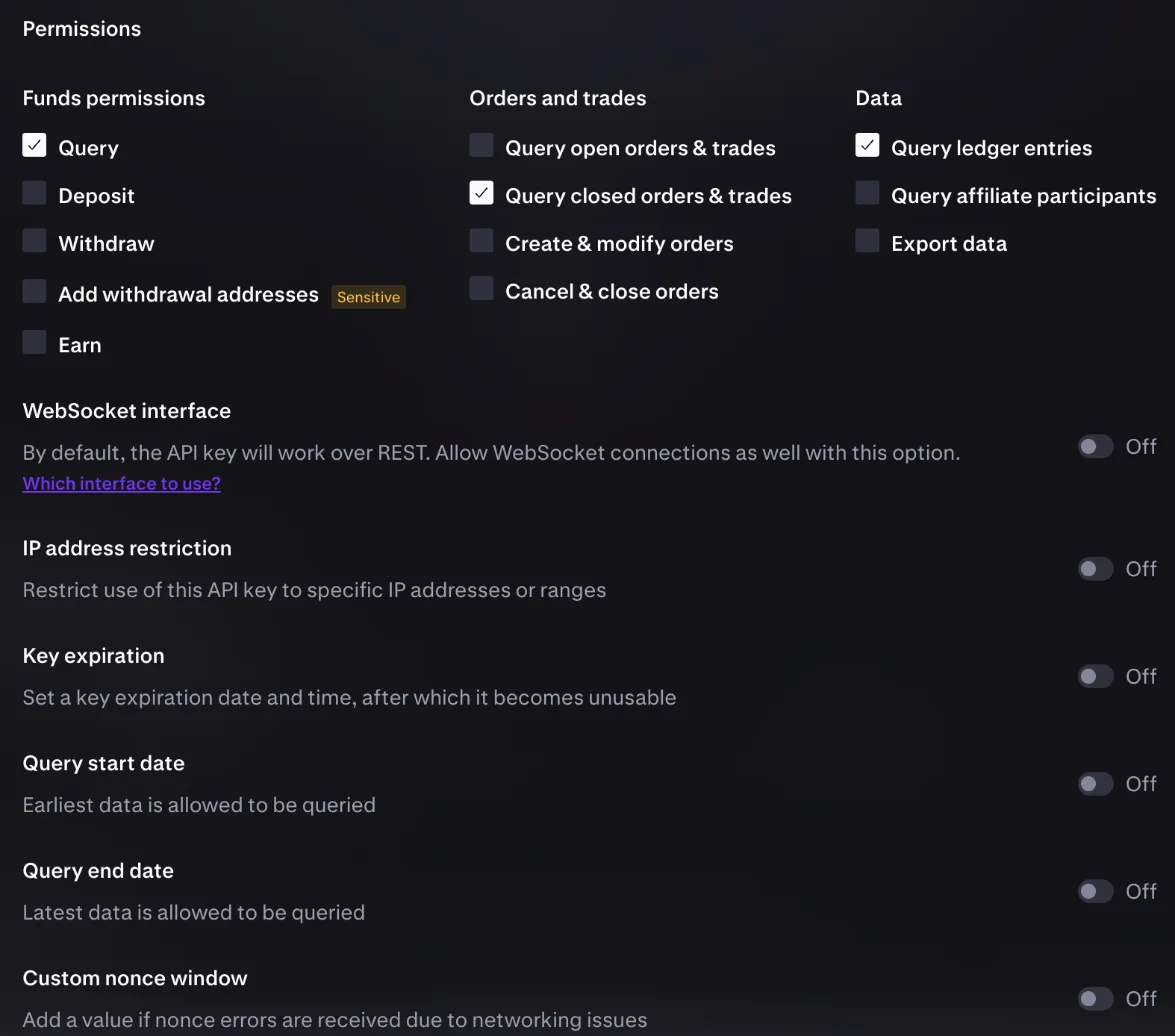
Tick only these three boxes and leave every toggle Off, including Query start date and Query end date. -
Create the key. Kraken shows the Private Key only once, so copy the API Key and the Private Key before you close the page.
-
In Viktury, open Add account, choose Kraken and paste both keys.
When you add the key, Viktury checks with Kraken that it has all three permissions. If one is missing, the form tells you which box to tick, and nothing is saved until the key passes.
What we import
- Spot trades, with the fee you actually paid.
- Crypto and bank deposits and withdrawals.
- Staking and Earn rewards, as income.
- Moves between your spot wallet and your derivatives wallet.
The first sync reads your whole history, and after that the account syncs once a day.
What is not supported yet
Your derivatives wallet and Kraken Futures trading are not shown yet. They are coming in a later update.
Margin trades, NFT activity and custody transfers are not imported. If your history has any of them, the account card says how many rows were left out. A trade we cannot match to Kraken's own trade list is left out too, and counted on the card. Viktury leaves these out rather than guess at them.
Troubleshooting
- The key is refused. If the form names a box, tick it for the key on Kraken and try again. Otherwise check that you copied both the API Key and the Private Key in full.
- Older history is missing. Open the key on Kraken and check that "Query start date" and "Query end date" are off. If either is on, create a new key with both off.