Revolut · Live
The Revolut trading journal
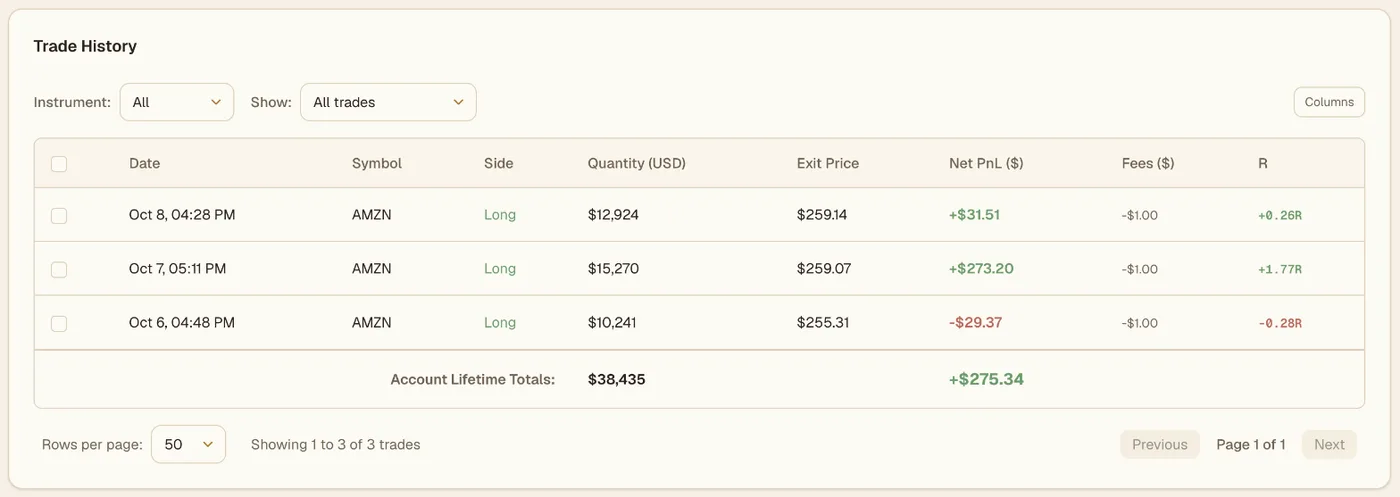
Viktury imports your Revolut executions via CSV import, matches them into round-trip trades first in, first out, and turns them into R-multiple analytics, playbook tracking, and mistake costs.
- CSV import
Imported from Revolut, shown with illustrative prices. IBKR import is next.
Viktury imports the stock and ETF trades from your Revolut statement, and handles stock splits. Revolut X, Revolut's crypto exchange, is a separate account in Viktury.
In Viktury
Your Revolut trades, reviewed
How it works
From Revolut to your stats
- 01
Export your Revolut trade history
Download your trade history CSV from Revolut and drop it into Viktury. The parser previews everything before anything is saved, and duplicates are flagged automatically.
Setup guide → - 02
Trades become round-trips
Individual executions are matched into round-trip trades first in, first out, with fees included. Each closed lot keeps the price you actually paid, so your stats reflect what actually happened.
- 03
Your edge, quantified
Win rate by setup, mistake costs and time-of-day performance from the trades you import, and R-multiples on every trade you give a stop.
Questions
Before you connect
How does Viktury import my Revolut trades?
Via CSV import. Upload the CSV export and preview every row before committing.
Does Viktury need trading or withdrawal permissions?
No. Viktury only ever needs read access to your trade history. Read-only API keys cannot place orders or move funds.
What data does Viktury read from Revolut?
Trade executions (instrument, side, size, price, fees, timestamps), enough to rebuild your round-trip trades. Viktury never reads balances it does not need, and never shares your data.
Is Viktury free to try?
Yes. The free plan stays free, and your first trades start 14 days of Edge with the full analytics. No card needed.
Can I import my Revolut crypto trades here?
Not with the Revolut statement import, which covers stocks and ETFs. Trades on Revolut X sync through a Revolut X account. Crypto bought in the main Revolut app is not imported yet.
Which Revolut statement do I upload?
The Account statement for your stocks account, not the Profit & Loss one. Choose Excel: despite the name it downloads a CSV, which is the file to upload as it is. In the app it is under Invest, then More, then Documents, where the account is called Stocks.
Why are some of my Revolut sells missing?
A sell becomes a trade when it is matched to the buy that opened it. If that buy is older than the statement you uploaded, the sell has nothing to match and is left out. Upload a statement that starts before the buy and it is matched like the rest.
Your Revolut stocks, reviewed like a trader.
Upload your statement and see every round trip.
Start free →No card · 14 days of Edge from first trades